
Designing Right: When to Choose UI Kits & When to Go Custom

Written by Shruti
Do you go for a tried and tested one like MUI or Carbon, which has a broad range of designed and developed components which is fast to implement but lack the unique feel and representation of your brand or
Do you go for a completely unique system which you create from scratch that best represents your brand on terms of color, typography, iconography and components which make you truly stand out but takes time to design and implement.
To find out what works best for you lets look at the quirky debate between Sir UI Kit and Captain Custom to find out.
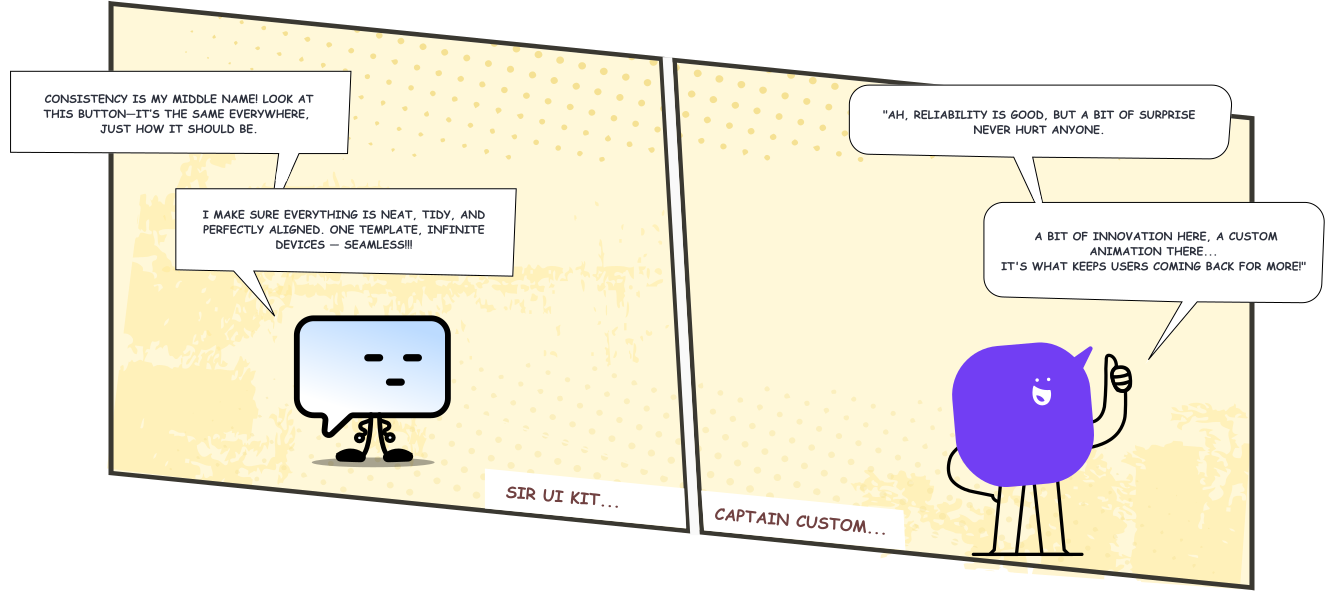
Consistency vs. Uniqueness
Custom Components deliver unique, memorable experiences, crucial for differentiation in competitive markets, but require more time and resources. The decision hinges on whether the priority is efficiency or distinctiveness.
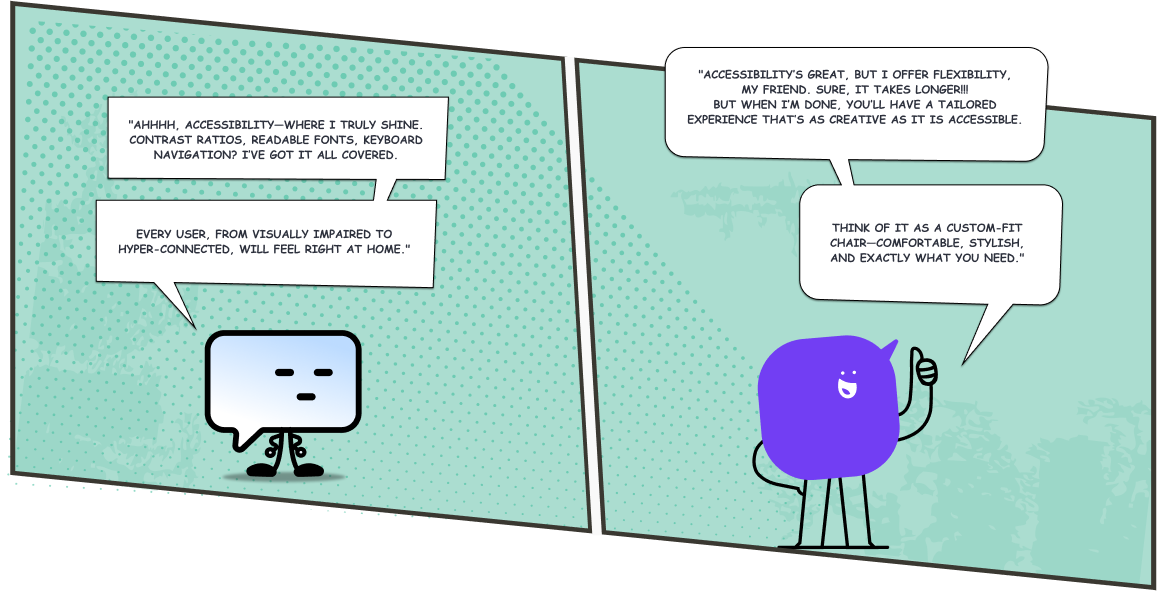
Accessibility vs. Flexibility
Custom components, while more time-intensive, create unique, tailored experiences that captivate users, especially in creative or luxury markets. They may require additional effort for accessibility but offer unmatched adaptability.
The choice depends on project goals, audience needs, and resource availability.
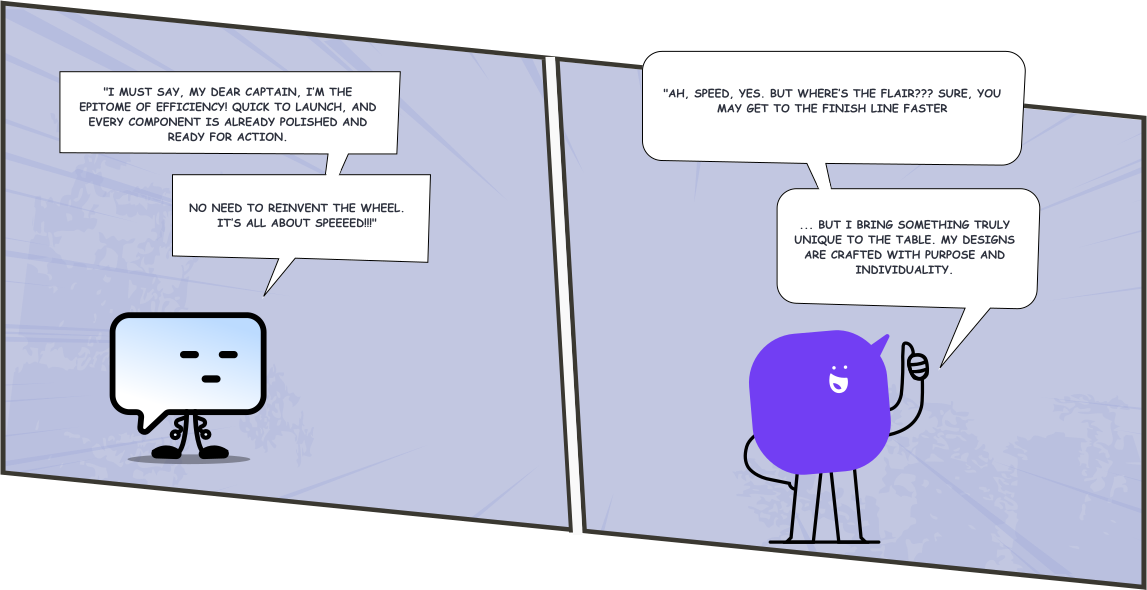
Speed vs. Customization
Custom Components cater to brands needing tailored solutions, essential for standing out in competitive markets like luxury or creative industries. While they take more time to build, their personalised approach can create lasting user impressions, as 46% of users judge a brand’s credibility based on unique visual design.
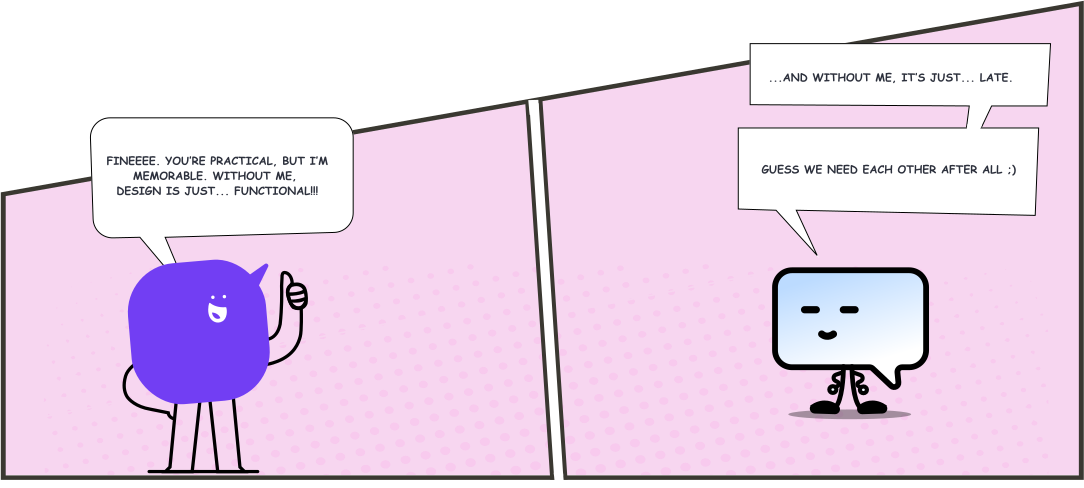
Moral of the Story: Whether you're aiming for speed, consistency, or flexibility, both Sir UI Kit and Captain Custom bring their own magic. It's about choosing the right tool for the right mission!
Find Your Fit:
UI Kit vs. Custom Components
Scaling Design Systems: A Journey to Consistency Across Teams

Scaling Design Systems: A Journey to Consistency Across Teams

Written by Anurag
Introduction
As the developer tasked with fixing this, you realize that what your organization needs is a design system. A system that ensures everyone is on the same page, no matter how many teams or products there are.
Understanding Inconsistencies: The Birth of a Unified Design System
truth—a design system that unifies these scattered elements and ensures consistency.
Collaboration is Key: Designers and Developers Working Together
But translating those designs into reusable code requires collaboration. You work with designers to ensure that the handoff is smooth and that the design tokens—colors, fonts, and spacing—are consistent across all components.
Building from Scratch vs. Using a Pre-built Library
As you start thinking about how to build this system, you weigh your options. Should you create everything from scratch, defining each component from the ground up, or could you leverage a pre-built library? For example, if you’re using React, you might consider a library like MUI. This approach allows you to customize components to fit your design system while benefiting from the time-saving features of a pre-built library.
A general principle is to strike a balance between efficiency and flexibility. Combining a pre-built library with tailored customizations ensures time-saving benefits while maintaining consistency and aligning with your brand’s identity.
- Styled Libraries: Predefined design language with ready-to-use components.some text
- Examples: Material-UI, Ant Design, Bootstrap
- Pros: Quick setup, consistent design.
- Cons: Limited flexibility for custom designs.
- Unstyled Libraries: Functionality-focused with no predefined styles.some text
- Examples: Radix UI, Headless UI, React-Aria
- Pros: Complete customization.
- Cons: Requires more effort and time for styling.
- Semi-Styled Libraries: Basic styles with easy customization options.some text
- Examples: Chakra UI, Tailwind UI, Base Web
- Pros: Balanced flexibility and efficiency.
- Cons: Some design constraints.
- Fixed Design Language Libraries: Strict adherence to a predefined design system.some text
- Examples: Material-UI (Default Mode), Ant Design, Foundation
- Pros: Ensures consistency.
- Cons: Minimal flexibility for unique branding.
- Web Components for Multi-Framework Support: A powerful choice for building reusable web components or meeting requirements where multi-framework compatibility is essential.some text
- Examples: Stencil.js
- Pros: Enables framework-agnostic components, reusable across different projects and frameworks.
- Cons: Requires expertise in web components and potential overhead for simpler projects.
What consideration you should make while choosing base component library
- Customizability: The library should support easy customization and theming for consistent alignment with your design system.
- Design Language Alignment: Ensure the library’s style aligns with your design system to avoid excessive overrides.
- Accessibility: Ensure the library supports accessibility features like keyboard navigation, screen readers, and WCAG compliance.
- Scalability: Ensure the library has all needed components, scales with your project, and supports integration with frameworks or styling tools like Tailwind or Sass.
- Performance: The library should support tree-shaking, lightweight components, and lazy loading for optimal performance and efficiency.
- Community and Support: Opt for a library with an active community, frequent updates, and accessible support channels to resolve issues, ensure longevity, and stay aligned with evolving standards.
- Documentation: Choose a library with clear, comprehensive documentation for easy usage, customization, and a smooth developer experience.
- Styling Approach: Choose a library compatible with your project’s styling needs, whether traditional CSS or CSS-in-JS, ensuring smooth integration with legacy systems or modern workflows.
Scaling the System
- Centralized Control: Wrapper components allow you to encapsulate common functionality or styles in one place, reducing duplication.
- Reusability: By abstracting shared logic or behavior, they make it easier to use the same functionality across multiple components.
- Extensibility: Wrapper components enable easy customization without affecting the core component structure.
- Adherence to SOLID Principles: They align with SRP by ensuring that each component focuses on one responsibility, keeping logic modular and maintainable.
- Applying consistent styles or themes across multiple components.
- Centralizing logic for tasks like event handling or state updates.
- Encapsulating error boundaries to handle errors in specific parts of the application.
- Conditionally rendering child components based on props or state.
- Providing a consistent structure or layout for related components.
Maintaining Consistency Across Teams
To address this, you introduce Storybook as a centralized hub for documentation. It provides live previews of each component, detailed usage instructions, and customization options. This ensures that every developer, whether working on new features or maintaining legacy products, can adhere to the same guidelines and best practices without compromising the system’s integrity.
Now, every developer, whether they’re working on a new product or maintaining an old one, can follow the same set of guidelines and best practices. You even include customization options so teams can adjust components without breaking the system’s integrity.

Written by
Anurag
Last Updated on Jul 16, 2025
How gaming could teach us about UX onboarding

How gaming could teach us about UX onboarding

Written by Sooraj Ramachandran
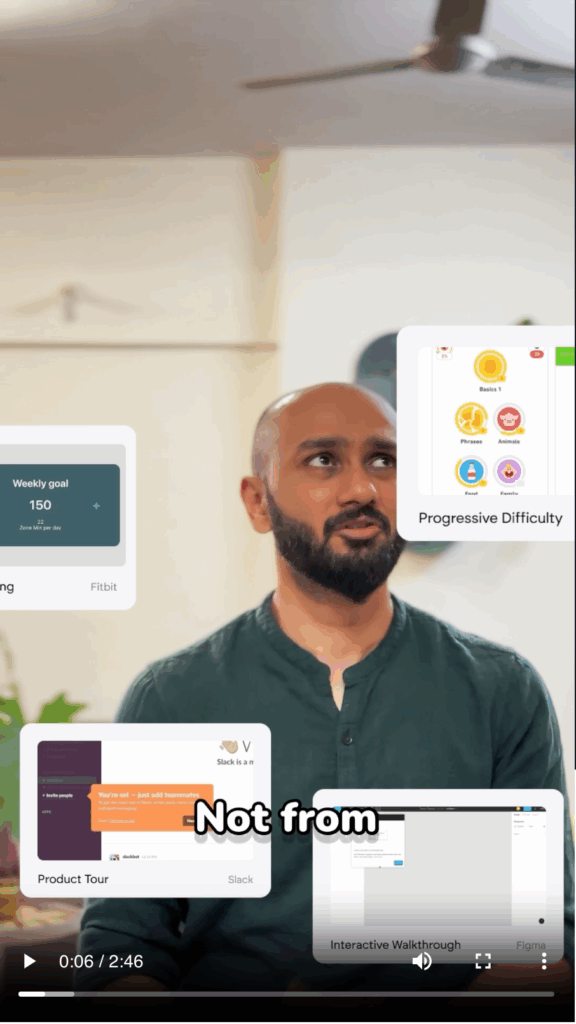
Ever thought gaming could teach us about UX onboarding? In this video, we explore how gaming techniques—like step-by-step introductions, subtle guidance, and avoiding information overload—create a more engaging, user-friendly onboarding experience.
Discover how these principles can make your app onboarding engaging.
Accelerating SaaS MVP Development: A Guide to Fast-Tracking Your Web App

Accelerating SaaS MVP Development: A Guide to Fast-Tracking Your Web App

Written by Akshay Kamble
Introduction
In the competitive world of SaaS, launching quickly is often the difference between success and being left behind. A well-executed MVP (Minimum Viable Product) allows businesses to test their ideas in the market, gather valuable feedback, and iterate before committing to full-scale development. But in a race against time, how can you ensure rapid development without sacrificing quality?
We will explore the essential tools and strategies for accelerating the development of a SaaS MVP, focusing on the power of full-stack frameworks, the right platforms for hosting and deployment, and a few key pitfalls to avoid. Whether you’re a startup looking to validate a new idea or a business eager to launch a new product, the faster you can deliver a working MVP, the sooner you can start refining and scaling your offering.
Full-Stack Frameworks for Faster Development
2.1 What is a Full-Stack Framework?
By bundling the core features required to develop, test, and deploy a web app, full-stack frameworks significantly reduce complexity and save time.
2.2 Why Use Full-Stack Frameworks for MVP Development?
1. Reduced Complexity and Faster Development
When developing an MVP, time is of the essence. Full-stack frameworks reduce the complexity of managing separate technologies for the front-end and back-end by providing an all-in-one solution. Traditionally, development teams would need to select and configure separate tools for both sides—often using a different language or technology for each layer of the application (for example, using React for the front-end and Express for the back-end).
With a full-stack framework, everything is handled within a single environment:
- Unified Tech Stack: Developers work within one technology stack (e.g., JavaScript) for both the client-side and server-side code, meaning less switching between tools and languages. This results in a more seamless development experience and allows teams to focus more on developing features instead of managing multiple environments.
By consolidating the development process into a unified environment, full-stack frameworks dramatically shorten development time, allowing you to deliver an MVP faster.
2. Built-in Features and Optimizations
Another advantage of using full-stack frameworks is that they come with a range of built-in tools and features. These frameworks are designed to be ready for production out-of-the-box, meaning that MVP developers don’t have to spend time building foundational components from scratch.
- Server-Side Rendering (SSR): Full-stack frameworks like Next.js and Nuxt.js offer server-side rendering by default. This helps improve performance and SEO, which is crucial for MVPs that rely on organic traffic and need to offer a smooth user experience from the start. SSR pre-renders the pages on the server, reducing the time it takes for content to load on the client side.
- Static Site Generation (SSG): Both frameworks also support static site generation, which can be a big win for MVPs. By pre-building static pages at build time, your application can deliver content faster, with reduced server load and better scalability right out of the gate.
- Routing: Full-stack frameworks come with a built-in routing system that allows developers to easily set up and manage different pages of the application without having to configure a separate routing library. This again reduces development time and the need for custom coding.
These built-in features allow developers to focus more on building unique functionalities specific to the product, rather than reinventing the wheel with common application features.
Extended Features with t3 and Wasp
For developers looking for more than the basics, t3 and Wasp offer additional features that further accelerate MVP development by handling many common tasks automatically.
- t3: The t3 stack includes TypeScript, Next.js, Prisma, and TRPC. This stack offers strong type safety across both front-end and back-end, thanks to TypeScript and TRPC’s type-safe APIs. TRPC eliminates the need for REST or GraphQL APIs, simplifying API calls and making the back-end communication more efficient. With Prisma, database management becomes easier with schema-based migrations, and the stack ensures smooth integration between the database and the front-end, all while leveraging Next.js for rendering and server-side functionalities.
- Wasp: Wasp is a declarative framework designed to automate much of the full-stack setup, handling tasks like routing, authentication, and database management out-of-the-box. It abstracts these tasks with simple declarative syntax, so developers don’t need to spend time configuring or writing boilerplate code. Wasp works with React on the front end and Prisma for database management, offering a minimal yet powerful framework that reduces complexity and accelerates the entire development cycle.
Both t3 and Wasp bring more built-in features to full-stack development, providing faster, type-safe APIs (t3) and a declarative approach (Wasp), making them ideal for developers who want to build MVPs quickly without worrying about repetitive configuration or setup.
3. Enhanced Developer Collaboration
When front-end and back-end development teams are working within separate environments, it can lead to communication gaps and integration challenges. Full-stack frameworks address this issue by uniting both front-end and back-end development in a single codebase. This facilitates better collaboration between teams.
- Monolithic Structure: A full-stack framework allows both front-end and back-end code to reside within a single codebase, forming a monolithic structure. This unified approach simplifies development, as developers can easily coordinate their work, track down bugs, and resolve issues efficiently without needing to manage multiple repositories or systems.
- Faster Iteration: As the entire application is built in a unified environment, changes can be made more efficiently, without the friction that comes from maintaining multiple codebases. This also means that features can be rolled out faster, and feedback from users can be acted upon more quickly.
This tight integration between teams and systems improves the efficiency of the development cycle and reduces friction in communication, making it easier to iterate on the MVP.
4. Strong Community Support
One of the most significant advantages of using popular full-stack frameworks like Next.js and Nuxt.js is the large community that backs them. These frameworks are widely used and well-maintained, which ensures access to:
- Extensive Documentation: Both frameworks have comprehensive documentation, making it easy for developers to get started and find solutions to common issues. This is especially valuable when building an MVP, where there isn’t always time to dig deep into complex problems.
- Third-Party Libraries: Full-stack frameworks have large ecosystems, offering plenty of third-party libraries and modules that can easily be integrated into your project. This makes it easier to add features like authentication, analytics, and payments without custom coding.
- Active Community: If you run into issues, chances are high that someone has already encountered the same problem, and a solution is readily available on platforms like GitHub, Stack Overflow, or forums dedicated to the frameworks.
This level of community support not only speeds up development but also ensures that your MVP is built on a solid, tested foundation.
Building on the Right Platform for SaaS MVPs
3.1 Why Choosing the Right Platform is Critical for Your SaaS MVP
Selecting the right platform is a crucial decision in the development of a SaaS MVP. The platform acts as the backbone for your application, impacting everything from development speed to scalability and future growth. The right platform can accelerate your development process, while the wrong one can lead to inefficiencies and future roadblocks.
Here’s why choosing the right platform is so important:
- Ease of Setup: In rapid MVP development, time is of the essence. A platform that offers quick setup and minimal configuration allows developers to focus on building core features instead of spending days configuring servers or managing infrastructure. Platforms like Vercel and Fly.io provide seamless integration with modern web frameworks like Next.js and Nuxt.js, enabling you to go from development to deployment in a matter of minutes. Their streamlined workflows reduce the amount of time developers need to spend on deployment, allowing for faster iteration and continuous delivery.
- Scalability: Even though you’re starting with an MVP, it’s essential to think long-term. Your MVP may attract more users than expected, or it might evolve into a full-scale product quickly. Platforms that automatically scale, such as Vercel and Firebase, ensure that as your user base grows, your infrastructure can handle the increased load without significant changes to your setup. This flexibility is key to avoiding downtime and performance bottlenecks when user demand increases.
- Cost-Effectiveness: Early-stage SaaS products often have limited budgets, so selecting a platform with a scalable pricing model is critical. A good platform offers a pay-as-you-grow structure, meaning you only pay for the resources you use. For example, Firebase provides a generous free tier for small projects, which allows startups to launch their MVP without incurring high costs initially. As your user base grows, the platform scales with you, with costs increasing gradually as needed, making it a budget-friendly option for MVPs.
- Developer Experience: A good platform should enhance the developer experience by providing useful integrations, documentation, and a user-friendly dashboard. Platforms like Supabase and Firebase offer built-in features like real-time databases, user authentication, and serverless functions, all of which help reduce the amount of custom code developers need to write. This results in faster MVP development, fewer bugs, and more focus on building the product’s unique features.
In summary, the right platform should not only support the rapid development of your MVP but also provide a pathway for future scalability and growth. By choosing platforms that prioritize ease of use, scalability, cost-effectiveness, and a great developer experience, you set your SaaS MVP up for success from the start.
3.2 Database and Authentication
Managing data and authenticating users are two key components of any SaaS application. Choosing the right tools for these functionalities can greatly impact both the speed of development and the user experience. Two popular choices that offer a combination of database management and authentication are Supabase and Firebase.
Supabase
- Real-Time Database: Supabase offers a real-time Postgres database, meaning any changes made to the data are instantly reflected across clients. This real-time feature is particularly useful for MVPs where live updates (e.g., chat apps, collaborative tools) are a necessity.
- Built-In Authentication: Supabase provides an integrated authentication system that supports multiple methods such as email, password, OAuth providers (e.g., Google, GitHub), and more. Developers can easily set up user authentication without having to implement custom solutions, which accelerates development.
- Scalable PostgreSQL: Supabase uses PostgreSQL, a powerful, scalable SQL database, allowing developers to run complex queries, create relationships between data, and access full-text search capabilities. This is beneficial for SaaS MVPs as it enables advanced data handling without requiring a migration to another database system as the app grows.
- Open Source: One of the biggest advantages of Supabase is its open-source nature. This allows teams to host the service themselves if needed, offering more flexibility and avoiding the risk of vendor lock-in.
- Storage and Functions: Beyond databases and authentication, Supabase also offers file storage and serverless functions (currently in beta), making it a versatile option for building out additional features as your SaaS product grows.
Firebase
- NoSQL Database: Firebase’s Firestore is a NoSQL document database that scales automatically with your application. It’s great for handling large amounts of unstructured data and offers real-time syncing across all connected clients. This is perfect for SaaS MVPs where collaboration and live data updates are needed, such as chat apps or real-time dashboards.
- Real-Time Sync: Firebase’s real-time database allows for instantaneous updates across all connected devices, making it ideal for applications requiring real-time collaboration or data updates (like messaging apps or collaborative SaaS tools). This is especially useful for MVPs where immediate user feedback and interaction is critical.
- Authentication: Firebase offers a fully managed authentication system that includes email/password logins, phone authentication, and social media logins (Google, Facebook, etc.). Firebase Authentication is easy to implement, making it a top choice for MVPs where quick, secure user management is essential.
- Serverless Functions: Firebase integrates with Cloud Functions, allowing developers to create server-side logic that automatically runs in response to certain events (e.g., database changes, API calls). This serverless approach is a big advantage for MVPs, as it eliminates the need to manage your own servers.
- Scalability: Firebase is designed to scale automatically, meaning that as your MVP grows into a full-fledged SaaS product, Firebase can handle increased user load without significant changes to your infrastructure.
- Cloud Storage: Firebase offers easy-to-use cloud storage for handling user-generated content like images, videos, and documents, making it a great all-in-one solution for SaaS products that require large file handling.
Choosing Between Supabase and Firebase
- When to Choose Supabase: If you need a more powerful relational database, full SQL support, or want to have more control over your backend infrastructure (especially with open-source flexibility), Supabase is an excellent choice. It’s ideal for developers who prefer PostgreSQL and are building apps that need complex queries and transactions.
- When to Choose Firebase: If you’re focused on rapid development, need real-time syncing out-of-the-box, and want a comprehensive suite of managed services, Firebase is a great fit. It’s perfect for MVPs that need speed, simplicity, and scalability with minimal setup.
3.3 Deployment and Hosting
Deploying your SaaS MVP quickly and ensuring it’s available to users with minimal downtime is critical. Platforms like Vercel and Fly.io streamline the deployment process, making it easy to push updates and ensure continuous delivery.
- Vercel: Vercel is optimized for Next.js applications, offering a seamless integration and an exceptional developer experience. Vercel provides automatic scaling, serverless functions, and edge caching to ensure fast performance across global regions. Its automated CI/CD pipeline pulls directly from your Git repository, automating build and deployment processes. This makes Vercel ideal for SaaS MVPs built with Next.js or other modern web frameworks.
- Fly.io: Fly.io is an excellent platform for deploying full-stack applications, offering global server locations and the ability to run applications close to users. It allows you to deploy Dockerized apps and supports various languages and frameworks, including Next.js, Rails, and Node.js. Fly.io automatically scales your application, managing load balancing and database replication across multiple regions. Its focus on edge computing ensures low-latency performance, making it a great choice for MVPs that need reliable and geographically distributed services without complex configurations.
Technical Risks in SaaS MVPs
Conclusion
Automated digital experiences need an outside-in approach.

Automated digital experiences need an outside-in approach.
Written by Anish Bhuwania
What could be better when you have someone else doing all the thinking and churning for you, making your life decisions and interactions easier and quicker. The new smart person is called ‘Artificial Intelligence (AI)’, and the invisible machine learning (ML) algorithms/data-models are developed by the coolest of engineers. ‘AI’ quietly and tirelessly works in the background capturing human digital interactions. The intelligent algorithms/data-models convert the pool of continuously flowing data into meaningful patterns, and channelize relevant streams of focused information and interactions in-context to a human’s behavioural needs. So next time you receive out-of-the-blue recommendations for connecting with folks on Facebook/LinkedIn you know where it’s coming from.
Interestingly, the intelligent algorithms/data-models are developed by humans, and the AI engine is only as good as the interpretation of data captured from humans, for shaping meaningful experiences for humans. Hence, in my opinion for shaping seamless and meaningful experiences, algorithms/data-models have to be developed in tandem with human experience designers. There are a lot of moving parts, and the intent of the algorithms/data-models have to align with the intent of the solution designed for humans.
Try purchasing a product on your preferred e-commerce platform. Having purchased the product, you will still see ad snippets of the product along your search/browse paths and on social platforms such as Facebook for a couple of weeks, if not days, enticing you to purchase the product. Can get annoying, is irrelevant, and at-times embarrassing depending on what you have purchased. Ever wondered why? It’s because the data-models have been developed to blast ad campaigns based on end-user click behaviours irrespective of last-mile human transactions.
Reference: https://www.technologyreview.com/s/510646/racism-is-poisoning-online-ad-delivery-says-harvard-professor/
Have you been followed by restaurant ads based on your search criteria’s when at NYC, all the way to when you were back home in India and later?
Automation can be delightful as well as scary, and questions about data confidentiality as well as ethical practices are all over. Moreover, algorithms often can be misleading.
I’m sure many of you must have reached a black-box when conversing with virtual agents like Siri, Cortana, etc. and often received responses such as, “I don’t know…”, “I’m not sure…”, “I don’t understand…”, and so on. This is because, in order for the agent to seamlessly respond it has to first understand what you are saying, what are you telling it to do, and how to improve to make your life easier.
Reference: https://www.fastcodesign.com/90132632/ai-is-inventing-its-own-perfect-languages-should-we-let-it
It’s extremely important to understand the data source/s, the type of data, the age of data, the data segments, and for what purpose it’s going to be used, and for whom. Designers are usually kept at bay from the data details and are made to focus on shaping engaging features and functionalities. Typically, automation products use pre-built algorithms/data-models and the quality of responses are an outcome of its inherent design.
Data has become a critical element for designing desirable, feasible and viable digital experiences for the future. Automation product developers should work in tandem with experience designers for shaping relevant, meaningful and trustworthy digital automation experiences.
All these years’ engineers have made good use of available data and developed intelligent algorithms for automated digital product experiences inside-out. It’s about time we start building digital products outside-in for customer value creation and seamless end-user experiences.
Looking forward to hearing your views and experiences.
Designing for Enterprise as opposed to Consumer products, is it different?

Designing for Enterprise as opposed to Consumer products, is it different?
Written by Anish Bhuwania
Over the last few years the distinction between designing experiences for Enterprise products versus Consumer products has significantly narrowed and in few scenarios is undistinguishable; thanks to the fast evolving and adopted trend for ‘Consumerization of Enterprise Products’, and the change in user behavioural patterns as well as expectations.
Today, Enterprise users are exposed to a wide array of consumer products as well as social applications in their day-in-life at work and home. Flexible Enterprise policies like ‘BYOD – bring your own device’ and ‘CYOT – choose your own tool’ has fuelled employee exposure to common productivity/communication tools in their work life and has proven to enhance employee productivity. Growing collaboration and accessibility needs (from anywhere and anytime) owing to the change in business dynamics as well as user behaviours have forced enterprise product creators to reshape their strategies (e.g. Microsoft Office vs. Google Docs) and imbibe social platforms as well as features. The overlapping experiences have uncovered an open design canvas for us ‘the experience designers’ and there is a noticeable change in the design thinking and approach. Mobile, gaming, etc. design paradigms have become a stimulus and seemed to be widely embraced for shaping intuitive and personalised enterprise product experiences.
User interface standardization between consumer and enterprise products is imminent and I believe if design paradigms are embraced responsibly and judiciously can significantly improve product adoption, engagement and user efficacy.
In view of my collaborations with several fortune 500 companies as well as product start-ups serving enterprise as well as consumer needs, there have been interesting learnings, and I believe there are several challenges which still exist in front of us while shaping enterprise product designs. Following are few aspects which may be worth keeping in mind while strategising solutions;
- Design innovation is important and equally risky if not considered judiciously – as designers we enjoy shaping new design patterns, offer newness to each and every product experience we engage with, and thereby always push boundaries for creating a difference. Yearn for design innovation at every opportunity may at times result in expensive outcomes.Enterprise products usually have significant legacy in terms of front-end / back-end technologies, house features and functionality that have matured with time; are backed by notable customer loyalty and a sizeable end-user base that may have fallen prey to ‘learnt helplessness’. The dynamics places us ‘the designers’ in a tricky situation as weaving radical and rapid innovation to the conventional and learnt interaction patterns may serve detrimental to the perceived product usability, overall user acceptance and bloat support costs.Over the last few years I got several opportunities to shape user experience design experiences for enterprise products in the ‘cloud computing, data centre, networking, enterprise security, insurance and banking, employee productivity, healthcare, law and litigation, etc.’ domains and realised that no matter how innovative an experience designers create, certain conventional interaction design paradigms have become an established and comfortable industry norm which are easily accepted by enterprise product companies and well understood by their customers and the product end-users. This could be owing to the fact that many established Enterprise products are progressively migrating to web/thin client and mobile versions. The situation many-at-times brews frustration and is considered as a creativity dampener. Having said that, in my experience it’s better to accept the norm and invest our energies and creativities in other areas of the product experience such as the overall information architecture, user journeys, micro-interactions, messaging, contextual help, etc. which could create a significant difference in the overall product experience. Offering playful and radically new interaction paradigms such as collapsed drawer/hamburger menus which may hide primary gateways under a click, creative iconography based slide-in/out menus which may get hard to relate with thus hamper discoverability, cards as a primary alternative to data-grids which may hamper the data consumption scale, etc. are received as being ‘good looking’ and ‘cool’ by product and marketing teams, however may be perceived as being counter intuitive and inefficient during design validation studies with prospective/actual users and resisted by engineering teams, thus a futile effort. A change from customary often induces significant unlearning and learning and may result in being detrimental to overall end-user productivity. As designers we need to be sensitive to the enterprise product ecology and acquaint ourselves with ‘when?’ and ‘where?’ to adopt conventional vs. innovate paradigms thereby keeping existing users happy as well as lowering the barrier for new ones.
- A ‘T-shaped’ profile is essential – being a designer for a consumer product of which you yourself may be or are a user such as ‘Facebook’, WhatsApp, etc. will be easier to connect with and design for, as opposed to designing experiences for enterprise products which may be full of unknowns. Designing for specialised user profile/s situated in unique environmental setups will require sound domain, technology and contextual understanding. For acquiring complete understanding about the product ecosystem and experiencing what end-users experience, the designer should have the knack and motivation for conducting research studies with Stakeholders as well as End-users. As a result, for designing successful enterprise products being a competent designer may not be enough as ‘the experience designer’ will need to have the qualities of a researcher, understanding about front-end user interface development technologies and its influence on the design, and possess good analytical skills.
-
- Success criteria’s are identical and have a long life-span – shaping a consumer product offers the designer quick gratification in terms of public visibility and acknowledgement from thousands of users and hence is usually a sought-after space. As designers we often draw-a-line between business and end-user goals, try and identify commonalities and create a design strategy which will cater to both their needs. In the case of consumer products it so happens that the originally conceived product user interface design experience gets often skewed and diluted with time owing to the disparity between business and user goals resulting in conflicting opinions. e.g. a multimedia product company may focus on monetisation via ads and hence channelize the users experience in a manner that may manoeuvre them in traversing as many ads before accessing the a/v content or intrude with splashing ads while the user is viewing the content. While a end-users goal will be to view a video of interest as quickly as possible without interference.An enterprise product development life cycle could be long and challenging and may take more than a year or two for the complete product to see the light of the day. Having said that, the best part about designing an enterprise product experience is that the business and end-user goals for the majority are identical and remain meaningful for a long time. e.g. employee productivity is directly proportional to enterprise savings/revenue. Hence you will be designing for a common vision with a lasting impact.For a consumer product short-cycles of updates are imperative for survival, while in the case of enterprise product design longevity is the key for success. As a result, it is extremely important to identify the business as well as end-user success criteria’s for an enterprise product carefully and shape the design paradigms with a characteristic of scalability and futurism.
-
- End-user profile’s as oppose to persona’s – we generally use the word ‘profile’ and ‘persona’ interchangeably, while their meaning and relevance for intended outcomes are different. ‘User Persona’ being the more commonly used verbiage are descriptive in nature and a semi-fictional representation of an ideal product user. Persona’s work well when the unknowns are high and the product direction has to be shaped on assumed facts about the probable target groups. User Profile’s are prescriptive as they are outlined basis facts and known user data.The user/s for Enterprise products are known and hence outlining a user profile is more relevant in this context as data for each aspect about the specific user will be readily available in the Enterprise. In a recent project engagement we went to the extent of talking with HR representatives for actual job descriptions of targeted user profiles. Subsequently, we also connected with the actual users for contextual understanding and ratification. The exercise gave us a deep-rooted understanding about the end-users psyche, goals, motivations and uncovered few extremely insightful day-in-life nuances which otherwise could have been overlooked, resulting in skewed outcomes.
-
- Design paradigms with a characteristic of futurism – Enterprises could have a world-class looking web product, a friendly mobile application, and an awesome CRM system, having said that if you were to ask them ‘Are your int./ext. product ecosystems connected?’ the answers would usually be ‘NO’, ‘NOT REQUIRED’, ‘NOT YET’, ‘HOPEFULLY SOON’, ‘THAT’S WHY WE ARE TALKING TO YOU’ and so on. As designers we invest a lot of our time and energy acquiring a holistic perspective about the product ecosystem during the very early stages of a project engagement, and in the case of a legacy enterprise product you would have often made suggestions such as ‘Shaping an omni-channel experience will increase user productivity and save operational costs’, ‘A responsive, adaptive or hybrid experience may be more suitable from a futuristic product adoption/usage perspective based on foreseen changes in user behavioural patterns’, etc. While the stakeholders will appreciate all suggestions and personally would have loved to pursue the ideal path, more often than not, the design scope usually gets curtailed by a myopic need owing to budgetary and time-to-release constraints. Thus, resulting in adopting a blinkered and tactical approach for shaping the product user experience design. More so, the race against time often steers designers towards cutting-corners for faster outcomes.Learnings from past project experiences have made me believe that as designers we should always shape design paradigms for futurism despite the immediate/near-term needs thus mitigate impending risks. If we adopt basic design fundamentals about adaptive/responsive grid structures, atomic and modular design components, fluid layouts, as well as scalable graphic and font libraries, the product design foundation will be robust and prepared for absorbing future needs. There may be a delta from originally planned effort/time, having said that, the quality of outcomes will be worth every penny invested.
-
- Primarily mouse/keyboard driven behaviour – The advent of touch-enabled interfaces has significantly influenced the design language of products (e.g. large tappable areas/objects, gesture-driven interactions). By virtue of everyday digital interactions we tend to ignore the usage of mouse and keyboard as an integral input device for enterprise applications, thereby leading to overlooked behaviours, and not the most optimum layouts for immediate to near-term needs, etc. The situation would often result in cycles of negotiation with the product owners and engineers, and skewed outcomes.While, there is nothing wrong in designing for the future, as experience designers its critical to ensure that our decisions do not compromise the immediate and near-term goals. In a past project we mitigated a similar situation by introducing viewing modes (alike Gmail – Comfort, Cosy, Compact) and adopted adaptive design constructs for fluidity and scale. In doing so, easily accommodated immediate, near-term and long-term goals from the business as well as users perspective and offered a higher level of control.
-
- Accessibility – Have you ever experienced customers shooting back about the interface colours being washed-out and not appealing at their end. Our fondness for Apple Mac machines is the cause. As designers, we diligently conduct all colour anomaly tests in our systems before delivering the artefacts to our customers and many-a-times tend to forget that the customer/end-user machines in the enterprise world are mostly Windows-based PC’s/Laptops. Try viewing your visual designs on a standard Windows-based PC and you will realise the reason for customers straining their cords. As a process its important you test your visual designs across different machines and displays including standard windows-based PC’s and Laptops. The traditional test for colour contrast wherein you take a B/W print-out of your designs works well as well.
-
- Intensive training and specialists for customisation is passé – How many times have you really needed to scan help files or seek long-hours of assistance while interacting with a consumer product? Generally your answer will be none or insignificant. In a situation wherein the assistance required is high, the product adoption curve is extremely low and a high drop-off rate is experienced. In today’s day-and-age, customers and end-users expect a similar experience while interacting with enterprise products. Customers of your product would not like to create heavy dependency on their vendors for smooth functioning of their enterprise applications and business. While end-users would like an experience that aligns with their innate behaviour, and reliance on training, as well as support channels for everyday work-life needs is considered as a barrier.
SaaS Product Go-to-Market Strategy

SaaS Product Go-to-Market Strategy.
Written by Anish Bhuwania
Have you been in a similar dilemma?

“Free Trial” is when a product is introduced in the market with all features accessible by potential users for a limited time-period at zero cost. In this model, products with many features are generally complimented with guided feature walkthroughs and tutorials for increasing awareness and reducing the users adoption curve. The advantage is that, the products’ value proposition is self-discovered by interested and aware users. In this strategy, the probability of churn is low considering that the free trial version users are the eventual end-users of the paid version as well. Having said, considering it’s time-bound, poses a huge challenge in effectively conveying the products’ value in a simple and direct way.
“Freemium” is when a product is introduced in the market with few features accessible by potential users for an unlimited time-period at zero cost. This model allows users to gradually get acquainted with the product, benchmark its alignment with their goals, and build a habit. When the need arises, the probability of a financial commitment and conversion is high, as users are confident about the value they will get by upgrading. Moreover, once the system is working and set, users are usually reluctant to change. Once again, the advantage is that, the products’ value proposition is self-discovered by interested and aware users. Having said, deciding which features should be offered for free, and across plans, so that the upgrades are exciting enough for users to progressively imbibe and embed the product in their day-in-life goals can become extremely nerve-racking.
“Demo” is when the business team schedule in-person or virtual meetings with potential customers to provide a live product walkthrough. This model helps focus the products’ value proposition and features in alignment with the customers’ business, quickly and accurately. In this model, convincing the key decision-maker at the get-go could result in a faster conversion. Having said, considering the products’ value proposition is judged by a decision-maker who will be sponsoring the budget, and may not be the actual end-user, could eventually result in a high churn rate.
Dimension #1
WHO are your “Customers”?

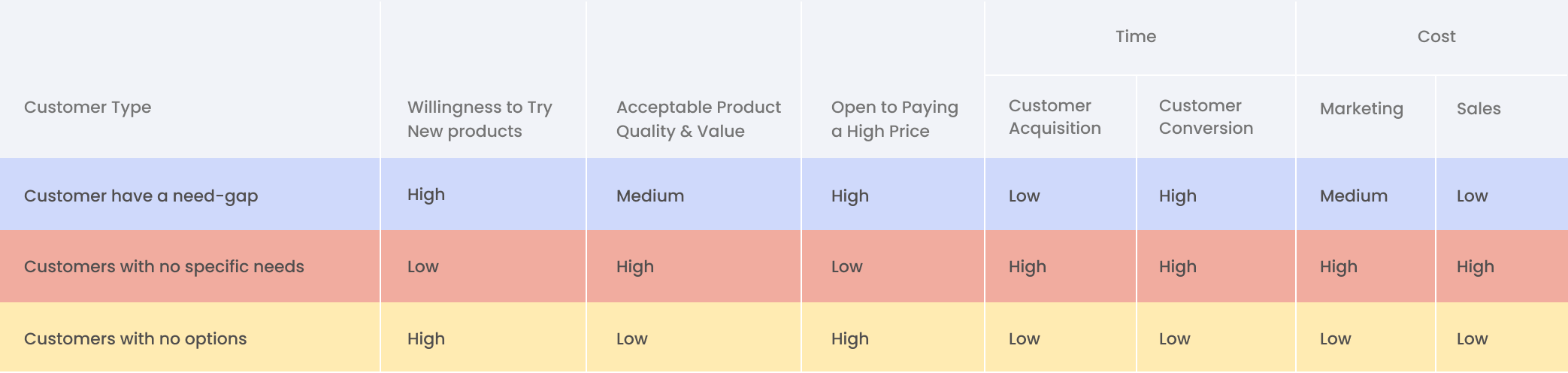
- “Customers have a need-gap” – and have unfulfilled needs or are using inadequate solutions owing to low~no availability. The general level of acceptance for trying new products, and adopting a perceivable average quality product for getting their needs fulfilled quickly is much higher. Moreover, these type of customers are willing to pay more to get their job done. Time plays an extremely important factor in their overall decision making process for ensuring their needs are quickly fulfilled. Hence, a ‘Free Trial’ customer acquisition strategy may work well as they would like to experience the entire product and its feature-set before committing.
- “Customers with no specific needs” – are satisfactorily using available solutions for bridging their needs. The general level of acceptance for trying new products is much lower. These customers are generally open to trying new and unique solutions if their existing needs can be adequately bridged by significantly cheaper alternatives. The overall product uniqueness, value to business, and cost, are important factors in their decision making process. Hence, a ‘Freemium’ customer acquisition strategy may work well in this scenario as customers would like to try accessible features for sometime before committing to a paid plan.
- “Customers with no options” – is an interesting twist to the aforementioned two customer types wherein they are forced to accept whatever is available in a specific situation. These customers are constrained by choice, and usually are ready to pay more for a product that is similar or perceivably lower in quality. Urgency of getting their needs fulfilled is an important factor in their decision making process. A good example for this scenario could be, when you cross the security gates at an airport for boarding a flight, and, when you may have purchased your first windows laptop (at some point, the Microsoft Windows OS was powering nearly ~80 percent of all personal computers in the world). Hence, a direct off-the-shelf customer acquisition strategy works well in this scenario as customers would be willing to pay any price for fulfilling their needs.
Dimension #2
WHAT “Market” do your customers thrive in?
- Is the market space crowded? – carving out a total addressable market of serviceable and obtainable customers in a crowded competitive space can become extremely challenging. Having said, customers are always on the look-out for new products which provide higher value at competitive price bands. They are generally driven by a community or industry trend. Hence, ‘Free Trial’ and ‘Freemium’ customer acquisition strategies may work well in this scenario as it would increase customer reach in a short amount of time and accelerate acquisition. Moreover, customers would get a chance to experience the product for sometime in their day-in-life benchmarking with already-in-use products. Thereby, obtain a higher level of certainty before committing to a specific paid plan.
- Is it a deserted or virgin market? – introducing a completely new concept or way of doing is not easy. Customers have a general tendency to gravitate towards products that may be off high interest to them or is needed for a certain purpose. Thereby, new products could easily get missed in a ‘spray-and-pray’ method. In this scenario, we have experienced a high-touch ‘Demo’ based targeted customer acquisition strategy working better as prospects react to a unrealised need or opportunity much better.
Dimension #3
WHY should customers choose your “Product”?
- It’s a simpler and focussed solution – Introducing a competitive product with lesser features is often perceived as being an inferior product. In reality it may not be the case, if the product is solving specific business and end-user pain-points effectively. Offering a comparable lower cost solution will attract prospects, and thus introducing a ‘Freemium’ or ‘Free Trial’ customer acquisition strategy at this point would work better.
- It’s a unique and innovative solution – When a unique solution is introduced in the market there are no customers as such, and acquisition can become challenging. You will have to do a need realisation, leading to a high awareness and learning curve for the targeted customer groups. Thus, a high-touch ‘Demo’ based marketing and sales strategy would work better.

Dimension #4
HOW are you “Selling” your product?
- Top-down strategy – focussed on high-level management (C-Level), the decision makers and sponsors? – this audience is primarily looking to bridge a gap fairly quickly and hence need pointed solutions and answers for their needs. Thus, a high-touch ‘Demo’ based strategy works better.
- Bottom-up strategy – focussed on end-users of the product, the influencers? – this audience loves tinkering with products as their primary goal is to become better at what they do. Hence, want to be extremely sure before influencing a purchase decision. Self-serve strategies like ‘Free Trials’ and ‘Freemium’ work better.
In today’s mature market, focussing on the overall product experience from a design as well as engineering point of view is utmost important. Continuously analysing and optimising the customer experience journey starting from product awareness, onboarding, and feature usage, is necessary for nurturing loyalty and garnering a reference-able community.
Customer centric to people centric

Customer centric to people centric.
Written by Anish Bhuwania
“Word-of-mouth advertising is the most effective, influential and reliable tonic for business success.”
Innovation drives evolution; evolution seeds opportunities, and opportunities surface competition. The current business scenario is like a souk offering myriad choices to people. It may get extremely difficult for companies (viz. telecom, airline, hospitality, travel, etc.) to preserve their market edge and differentiation merely by price or products. A product, its features and pricing strategies could easily be mimicked and re-offered with a subtle twist by a competing brand. Although as early adopter’s the product and compelling pricing strategies could definitely solve pointed consumer problems and win customers, however insulated solutions may not be enough for fostering customer loyalty. It’s about time companies widen their lens and fine-tuned strategies beyond product user/customer experience and think about the ecosystem in entirety and how the touch-points are influencing people.
A well designed people experience impact (PEI) approach exploring the relationship between people (potential customers + customers) and brands, and how the interactions with different brand service channels influence the entire journey of people from being a potential customer to a loyal customer could reveal
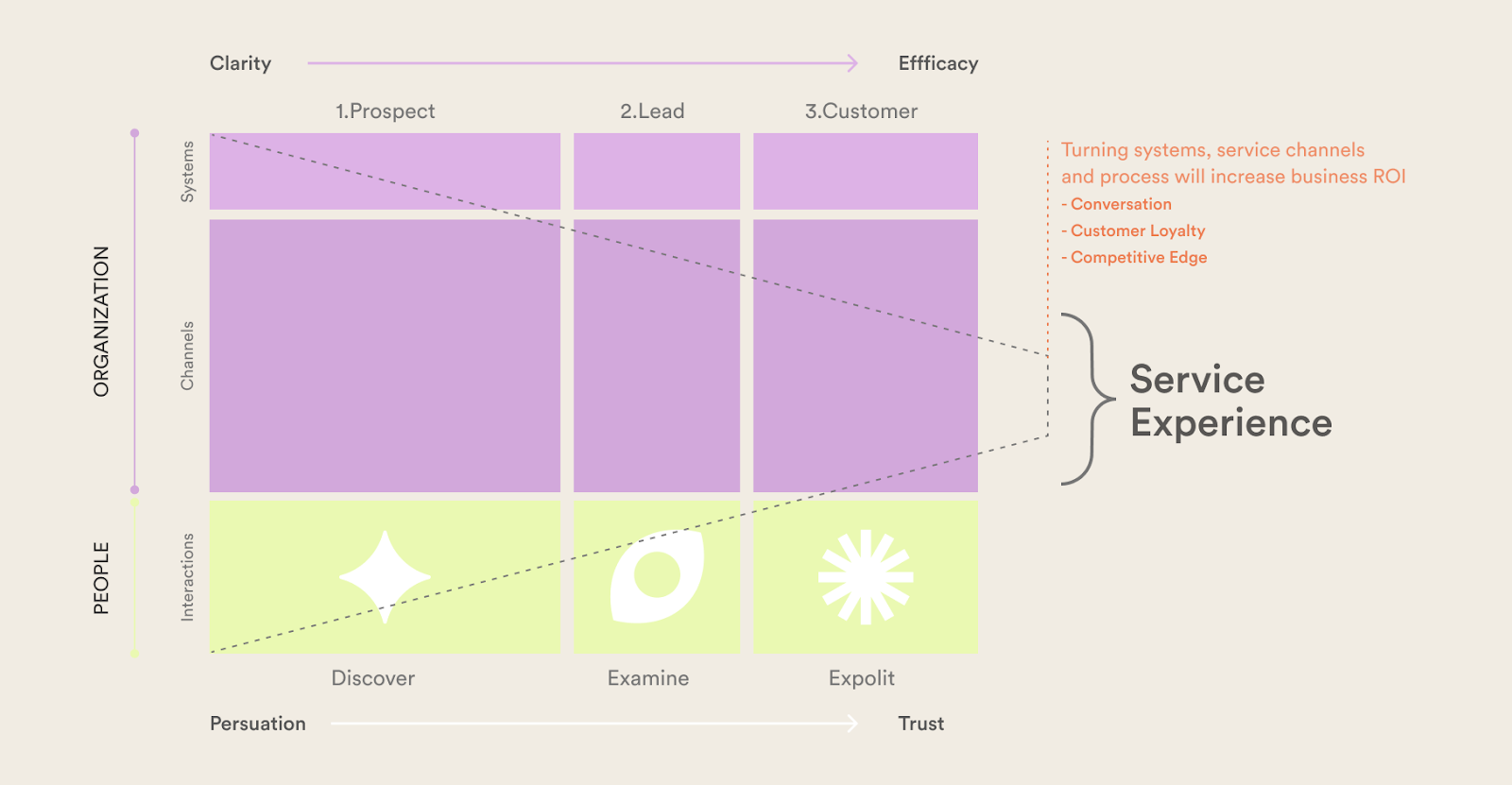
Shaping a quality service delivery ecosystem is about… tuning the ecosystem’s power of persuasion and inducing trust.
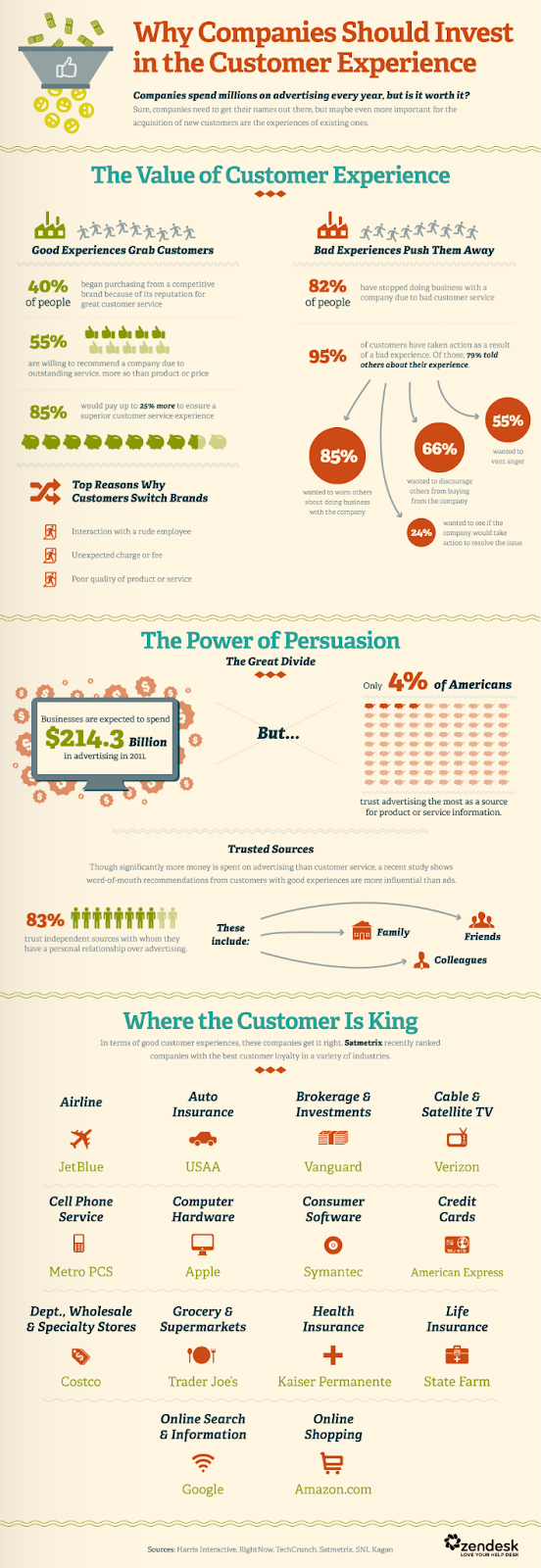
“Word-of-mouth is the valuable currency in today’s advertising-saturated world.” — Jackie Huba and Ben McConnell, authors of Creating Customer Evangelists
With growing market demands and service channels, it may be challenging for a company to sustain and upkeep the ecosystem. Slicing a fraction of the budget for continuous PEI studies (People Experience Impact) will ensure delivery of top quality experiences and services, thereby foster the customer relationship, spawn value and ensure sustainability.
“As a consumer of various services and products I value personal recommendations more than gimmicky advertising…let me know what you feel.”
Future-proofing by design.

Future-proofing by design.

Written by Anish Bhuwania
Every sector is seeing a massive growth in data, influencing their digital business transformation strategies, and empowering technologies such as ‘Artificial Intelligence (AI)’, ‘Machine Learning (ML)’, ‘Deep Learning (DL)’, and so on . It’s important for digital product design experiences empowered by data and connected technologies to be malleable for easily accommodating the rate of data scale and change, for delivering meaningful experiences.
Be clear, be confident and don’t overthink it. The beauty of your story is that it’s going to continue to evolve and your site can evolve with it. Your goal should be to make it feel right for right now. Later it will take care of itself. It always does.
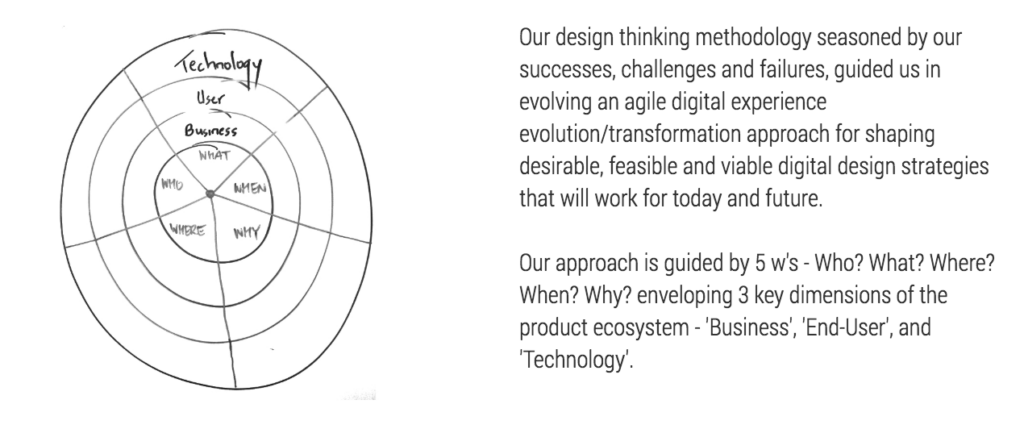
The challenge was to envision a product experience that was unique and effective for managing a legal firm. If the product failed to do so, the attorney could simply turn to a regular project management tool just like any other organisation.
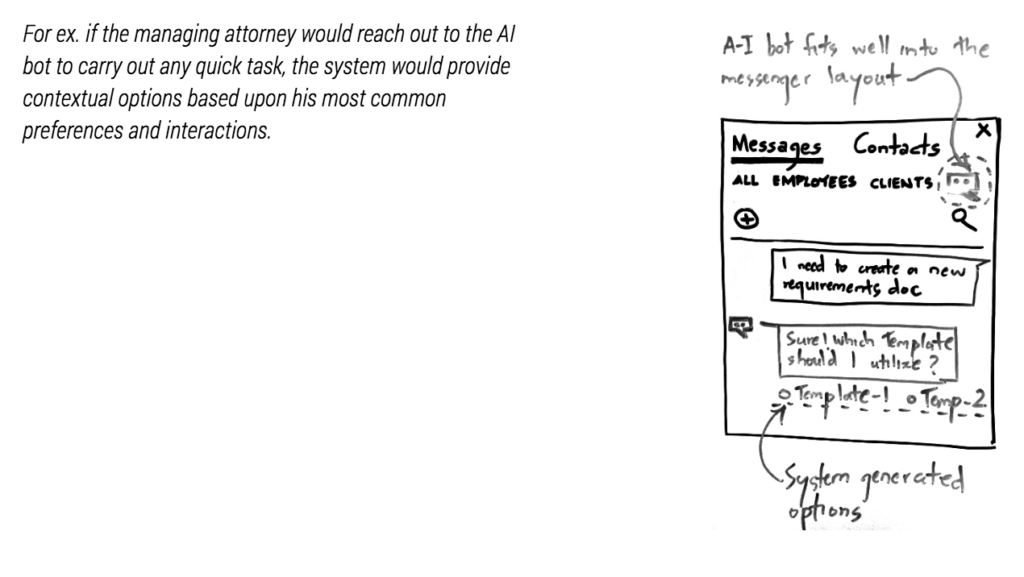
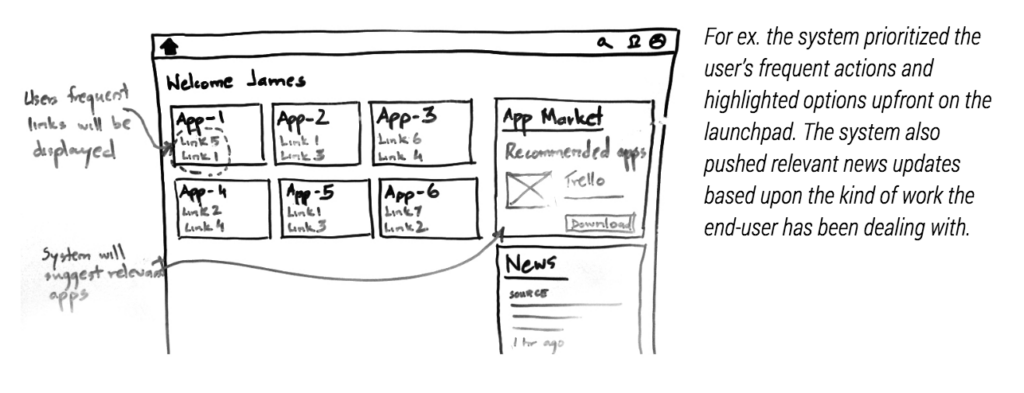
The business stakeholders wanted to design an intelligent product that could observe and truly understand the end-user’s behaviour, in doing so deliver a personalised and an efficient experience to each end-user. In order to achieve the intended experience, we conducted a thorough study about the ecosystem and realised that its a multi-tenant data-intensive transactional application. Since, acquiring and synthesising behavioural data-driven insights will take time, a progressive experience design strategy for ensuring a seamless journey to the end-users was adopted as an optimum solution. As the system continues to learn from acquired data, 3 levels of intelligence will get empowered progressively – the first being ‘Artificial Intelligence’ , second is ‘Machine Learning’ and finally ‘Deep Learning’ algorithms will get trained for delivering an optimum experience.
Artificial Intelligence
An ‘AI bot’ worked well for this function since the system could be fed with the user’s trending interactions from a database that would get richer over time; leveraging the product’s maturity to its advantage.
Machine Learning
Deep Learning
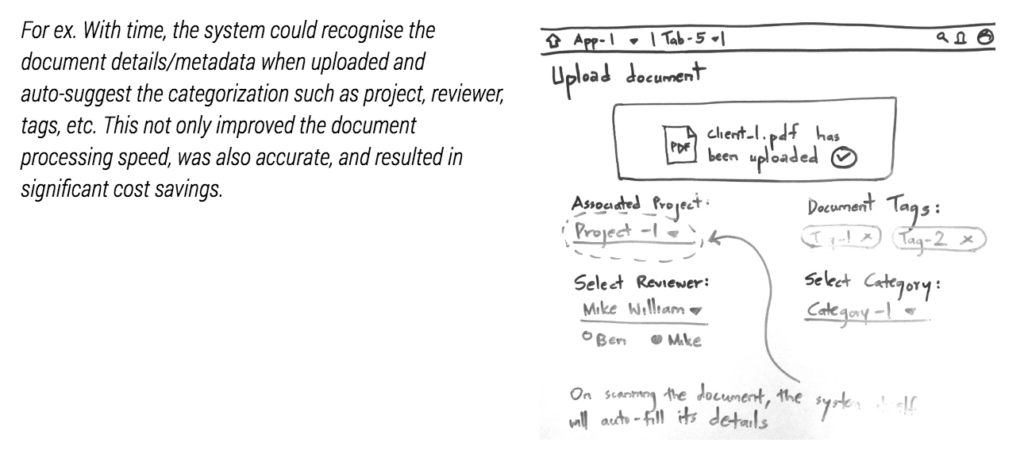
The introduction of a deep-learning algorithm early in the product architecture helped eliminate the need for an entire team and several hours of dogmatic work in the future. Moreover, redesign and redevelopment of the user interface was not required as it was already envisioned to accommodate the products maturity curve.
The secret recipe resides in strategising a framework that allows the system to progressively evolve for continuously optimising the end-users experience with usage. Not being able to stay in-tune with the ever-growing changes and advancements, is a major reason why many products fail to preserve their user loyalty as well as acquire new users over time. Our design thinking approach is in tandem with our philosophy ‘partners in your digital journey’; as your success is our success.
Principles of UX Design in a No-UI, AI-Driven World

Principles of UX Design in a No-UI, AI-Driven World

Written by Rahul Padsalgi
In this context, embracing UX within a No-UI landscape becomes crucial as we transition towards chatbot-style interfaces. Designers are shifting from focusing solely on visual aesthetics to crafting immersive conversational experiences. The new emphasis is on creating engaging, intuitive, and emotionally resonant interactions through text and voice. This evolution expands the role of UX designers beyond traditional boundaries, encompassing language design, user feedback integration, error handling finesse, microcopy creation, and the development of adaptive systems tailored to diverse user environments.
As the role of UX designers evolves to meet these new demands, it becomes essential to adhere to guiding principles that ensure effective and user-centered design. By integrating these principles, designers can better navigate the complexities of AI and conversational interfaces, ensuring that the user experience remains intuitive and engaging despite the design shift.
1️⃣ Design Responsibly: Focus on the user’s needs and pain points rather than the technology itself. Given that AI represents a relatively new UI paradigm, users might be unfamiliar with its capabilities. It’s essential to provide easy starting points, outline possibilities, and clarify the tool’s limitations to guide and support users effectively.
2️⃣ Design for Mental Models: Improve user experience by aligning with existing mental models and using familiar product constructs to minimize the learning curve during AI interaction. This approach provides a solid foundation for deeper exploration and engagement.
3️⃣ Design for Appropriate Trust & Reliance: Provide rationales for AI outputs by identifying source materials, which are crucial for building user trust and supporting decision-making. Users value and trust results more when they can see the underlying work. Build this trust by displaying analysis steps during loading states and allowing users to interact with citations for supporting references.
4️⃣ Design for Co-Creation: Help users define effective outcome specifications and provide explanations for AI decisions to enhance trust and understanding. When AI misinterprets or hallucinates, it’s important to empower users to correct mistakes. With Enterpret’s Wisdom, users can view the steps taken by the AI and have the ability to inspect and modify results for more precise outcomes.
5️⃣ Design for Imperfection: Manage uncertainties strategically and offer ways for users to recover from errors. To improve AI performance, provide users with subtle options to submit feedback.
As we navigate the evolving landscape of AI interactions, the role of UX designers has become more critical. Following these guidelines allows designers to leverage challenges as opportunities, crafting interfaces that go beyond mere functionality to offer truly meaningful user experiences.This shift demands a new level of creativity and adaptability, pushing the boundaries of traditional design practices. Ultimately, the success of AI integration hinges on our ability to balance technological innovation with a profound understanding of the human experience.